In a headless payment integration, WHMCS provides the payment data but does not provide the interface that displays it. Your application renders the payment form itself and keeps the client in your application while they complete checkout, instead of returning them to a WHMCS page for payment.
The workflow is the same for any payment gateway module that supports headless payment sessions (Stripe Dynamic Payments, PayPal Payments, or PayPal Card Payments). The examples below use the Stripe payment gateway and WHMCS API version 2.1.0.
WHMCS returns the same four values in every payment session:
- The
providervalue is the gateway that issued the session. - The
paramsvalue is the set of keys that the gateway's SDK accepts. - The
settlementvalue is the method that records the payment. - The
sdkvalue is the method that loads the client-side library.
Only the contents of the params value differ between gateways. For Stripe, the params value contains a client secret for Stripe.js. For PayPal, it contains an order ID for the PayPal SDK. Use the provider value to determine which gateway SDK to pass the params value to.
The gateway serves the iframe element that collects card details. The iframe element submits those details directly to the gateway. The details do not pass through WHMCS or your server. This allows the merchant to use the shortest PCI DSS self-assessment. The scope of any given assessment depends on the merchant's wider environment.
For more information about how Stripe describes this boundary, see Stripe security.
The payment flow below assumes that a cart is ready for checkout or an unpaid invoice is ready for payment. For more information, see Custom Buy-Flow.
Headless payments use the following payment flow:
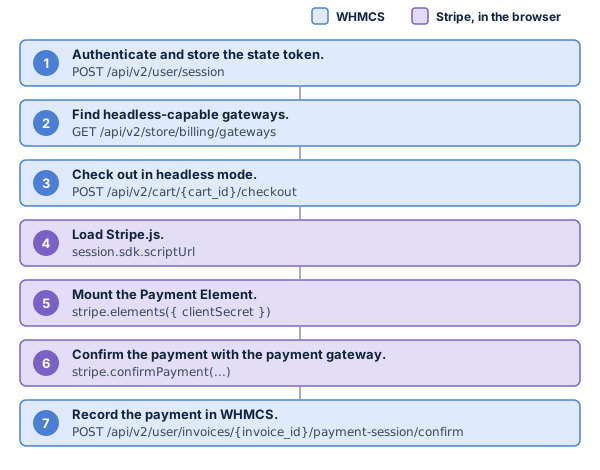
Sign the client in, and then store the X-Api-State token that WHMCS returns with the response.
- Every
/user/*endpoint and checkout body that authenticates as an existing client requires theX-Api-Stateheader. This header contains the/user/sessionstate token, which includes the client and user IDs if they exist. - A guest who registers during checkout does not need a prior
/user/sessioncall. Instead, the checkout response returns anX-Api-Statevalue for the new client.
Store the /user/session token using a method that retains it through full-page redirects, to ensure that it is available after the client returns from a redirect payment method.
For more information about the X-Api-State header and how to sign a client in, see Authentication.
The wrapper below uses the sessionStorage object to store the most recent value and send it with the next request:
const api = (() => {
  const KEY = 'whmcs-api-state';
  let state = sessionStorage.getItem(KEY);
  return async function api(path, init = {}) {
    const res = await fetch(`/api/v2${path}`, {
      ...init,
      headers: {
        'Content-Type': 'application/json',
        ...(state ? { 'X-Api-State': state } : {}),
        ...(init.headers || {}),
      },
    });
    const refreshed = res.headers.get('X-Api-State');
    if (refreshed) {
      state = refreshed;
      sessionStorage.setItem(KEY, refreshed);
    }
    const body = await res.json().catch(() => ({}));
    if (!res.ok) throw Object.assign(new Error(`${path} → ${res.status}`), { status: res.status, body });
    return body;
  };
})();Request the list of payment gateways from the store and filter it to find the available payment gateways with a supports_headless_payment_session value of true:
const { data: gateways } = await api('/store/billing/gateways');
const headlessCapable = gateways.filter(g => g.supports_headless_payment_session);curl -X GET --location "https://example.com/api/v2/store/billing/gateways"
-H "X-Api-State: <your latest state token>"A gateway with a supports_headless_payment_session value of false returns a 422 response for a headless checkout.
Check the cart out through the checkout endpoint. Set the payment.mode value to headless to ensure that WHMCS returns a payment session instead of a redirect:
const { data: checkout } = await api(`/cart/${cartId}/checkout`, {
  method: 'POST',
  body: JSON.stringify({
    paymentmethod: 'stripe_dynamic',
    payment: {
      mode: 'headless',
    },
  }),
});

const { invoice_id, payment } = checkout;curl -X POST --location "https://example.com/api/v2/cart/TLlowSWlQjGkGrC1/checkout"
-H "Content-Type: application/json"
-H "X-Api-State: <your latest state token>"
-d "{\"paymentmethod\":\"stripe_dynamic\",\"payment\":{\"mode\":\"headless\"}}"Use the payment.status and payment.next_action.type values from the checkout response to determine your application's next action.
For example:
const action = payment.next_action;
if (payment.status === 'not_required')    return done(invoice_id);   // No invoice. invoice_id is 0.
if (payment.status === 'paid')            return done(invoice_id);   // Already paid.
if (action?.type === 'redirect')          return followRedirect(action.url);
if (action?.type !== 'payment_session')   return handlePendingOrFailed(payment);

const session = action.session;   // { provider, params, settlement, sdk }
if (session.provider !== 'stripe') return renderOtherProvider(session);
The payment.status value reports the outcome:
paid— The payment gateway has already accepted payment.pending— A payment is in progress.action_required— The payment needs a payment session.not_required— The order did not generate an invoice. Theinvoice_idvalue is0and thenext_actionvalue isnull.failed— The attempt did not complete.
The payment.next_action.type value returns payment_session for headless payments. Use the session value to load the payment session in the browser (step 4).
WHMCS does not generate an invoice for a free billing cycle. It does generate one if a promotion discounts the order to a zero balance, and the payment.status value is then paid.
A checkout request can name a stored payment method through the payment.paymethod_id value. If the gateway declines it, the payment.status value is failed and the API does not return an error response. A headless checkout also returns a new payment_session value in the next_action value.
Use that value to collect a different payment method:
if (payment.status === 'failed' && action?.type === 'payment_session') {
  return renderPaymentElement(action.session);
}For more information, see Stored Payment Methods.
A 422 response indicates that the gateway does not support headless payment sessions, cannot open a session, or is misconfigured.
Checkout places the order and generates its invoice first. It then screens for fraud and resolves a payment strategy. The payment strategy creates the session against the existing invoice.
A checkout can reach a session and then fail, returning a failed status. Retrying the same cart returns the same order and invoice_id value with one of the following statuses:
paid— The payment cleared.pending— A payment is in progress.action_required— WHMCS created a new session.- A
422response — WHMCS could not create a new session.
Load the script that the session.sdk.scriptUrl value specifies into your page. WHMCS cannot create a session without a scriptUrl value.
Then, construct a Stripe instance from the session's publishable key and API version:
async function loadSdk(scriptUrl) {
  if (window.Stripe) return;
  await new Promise((resolve, reject) => {
    const el = document.createElement('script');
    el.src = scriptUrl;
    el.onload = resolve;
    el.onerror = () => reject(new Error(`Could not load ${scriptUrl}`));
    document.head.appendChild(el);
  });
}

await loadSdk(session.sdk.scriptUrl);
const stripe = Stripe(session.params.publishableKey, {
  apiVersion: session.sdk.apiVersion,
});
The sdk.apiVersion value is the gateway API version that WHMCS pinned. Use this version to ensure that the browser transacts on the correct version for the session.
- Do not pin your own version. The payment gateway module supplies this value, and it can differ between installations and module versions.
- Stripe also ships dated Stripe.js builds such as
acacia,basil, andclover. Each dated build pins its own Stripe API version and does not accept an override.
For more information, see Stored Payment Methods and Stripe.js versioning.
Pass the session's clientSecret value to the elements object. Then, mount the paymentElement value into a container in your page:
const elements = stripe.elements({ clientSecret: session.params.clientSecret });
const paymentElement = elements.create('payment');
paymentElement.mount('#payment-element');
A session.params.mode value of payment indicates that the session has a PaymentIntent object.
- Do not pass the value to the
stripe.elements()method. It applies to Stripe's deferred-intent pattern. The headless payment flow does not use that pattern because WHMCS creates the intent. - If the client abandons the payment after WHMCS creates the intent, the invoice remains in the
Unpaidstatus.
Call the stripe.confirmPayment() method with the elements group and a return_url value, so that Stripe can collect the payment and run any authentication challenges:
const { error, paymentIntent } = await stripe.confirmPayment({
  elements,
  redirect: 'if_required',
  confirmParams: {
    return_url: `${window.location.origin}/checkout/return?invoice=${invoice_id}`,
  },
});Do not pass the clientSecret value to the elements object again in this step. Passing it again switches Stripe to its deferred-intent flow.
A 3D Secure (3DS) or Strong Customer Authentication (SCA) challenge on a card opens as a modal inside Stripe's iframe element, and the stripe.confirmPayment() method resolves in the same page load. The redirect: 'if_required' value prevents a redirect.
The session source determines the allow_redirects value, which in turn determines which methods the element offers:
| Session Source | Allows Redirects | Methods Resolved on a Test Account |
|---|---|---|
POST /cart/{cart_id}/checkout | never | Card, Link, US bank account |
POST /user/invoices/{invoice_id}/payment-session | always | Card, Link, US bank account, Klarna, Cash App Pay, Amazon® Pay |
The methods an account offers depend on what the merchant has enabled and on the invoice currency.
Pass a return_url value for both session sources. If the client selects a redirect method, they leave for the provider's page and return to that URL. Stripe appends the payment_intent, payment_intent_client_secret, and redirect_status values to the return_url value.
A redirect returns as a new page load, and the session object is no longer available. The return URL contains the invoice ID that you set and the PaymentIntent ID that Stripe appended.
Read both values from the query string, then confirm and poll:
// On the return page.
const q = new URLSearchParams(window.location.search);
const invoiceId = q.get('invoice');
const paymentIntentId = q.get('payment_intent');

await confirmPaymentSession(invoiceId, paymentIntentId);
await pollUntilPaid(invoiceId);
A successful return indicates that the client completed the payment in the browser. The invoice remains in the Unpaid status until your confirmation call or the webhook records it.
Stripe does not sign the redirect, so the payment_intent, payment_intent_client_secret, and redirect_status values are query parameters that anyone can set.
The confirmation endpoint takes a provider_reference value. WHMCS then reads the PaymentIntent object from Stripe with the merchant's secret key. WHMCS rejects a PaymentIntent object whose metadata does not name this invoice and this client. WHMCS records the status that Stripe reports, so a forged return cannot change the recorded outcome.
Handle the payment outcome using the error value that the stripe.confirmPayment() method returns:
if (error) {
  if (error.type === 'card_error' || error.type === 'validation_error') {
    return showRetryable(error.message);
  }
  return showFatal(error.message);
}
After a declined payment in the browser, the PaymentIntent object returns to a requires_payment_method status. The same clientSecret value stays valid and the element can attempt another confirmation. Do not create a new session to retry payment: a new session for the same invoice will result in duplicate payment intents.
If a failure occurs after the client approves payment, the approval remains valid.
- For Stripe, the webhook records the payment if Stripe can reach the installation.
- For PayPal, nothing captures the payment.
Use the session.settlement value to decide whether to call the confirmation endpoint. This value describes how a gateway integrates.
Then, poll the invoice until it reaches the Paid status:
if (session.settlement === 'async_webhook') {
  await pollUntilPaid(invoice_id);
} else {
  await confirmPaymentSession(invoice_id, session.params.paymentIntentId);
  await pollUntilPaid(invoice_id);
}
All payment gateways that support headless payments return a sync_confirm value. When a payment gateway returns this value, WHMCS only records the payment after you confirm it.
Without that confirmation:
- Stripe — The invoice remains
Unpaiduntil thecharge.succeededwebhook arrives, and that webhook requires Stripe to reach the merchant's installation. - PayPal — The approval expires uncaptured, and no webhook recovers it.
Call the confirmation endpoint with the gateway's reference for the payment.
- For Stripe, use the
params.paymentIntentIdvalue. - For PayPal, use the order ID from the
onApprovecallback.
For example:
async function confirmPaymentSession(invoiceId, providerReference) {
  const { data } = await api(`/user/invoices/${invoiceId}/payment-session/confirm`, {
    method: 'POST',
    body: JSON.stringify({ provider_reference: providerReference }),
  });
  return data.payment;    // { status: 'paid' | 'pending' | 'declined' | 'failed', message? }
}curl -X POST --location "https://example.com/api/v2/user/invoices/1234/payment-session/confirm"
-H "Content-Type: application/json"
-H "X-Api-State: <your latest state token>"
-d "{\"provider_reference\":\"pi_3MtwBwLkdIwHu7ix28a3tqPa\"}"WHMCS returns a 200 response whenever the gateway responds.
- If you receive a
paidstatus, the payment succeeded. - If you receive a
pendingstatus, the payment is in progress. Keep polling the invoice.
For more information about this endpoint's status values and error responses, see the API Reference and HTTP Status Codes.
Poll the invoice until it reaches the Paid status or the timeout expires:
async function pollUntilPaid(invoiceId, { timeoutMs = 120000 } = {}) {
  const deadline = Date.now() + timeoutMs;
  let delay = 1000;
  while (Date.now() < deadline) {
    const { data: invoice } = await api(`/user/invoices/${invoiceId}`);
    if (invoice.status === 'Paid') return invoice;
    if (['Cancelled', 'Refunded', 'Draft'].includes(invoice.status)) {
      throw new Error(`Invoice ${invoiceId} is ${invoice.status}`);
    }
    await new Promise(r => setTimeout(r, delay));
    delay = Math.min(delay * 1.5, 8000);
  }
  throw new Error(`Timed out waiting for invoice ${invoiceId}`);
}
WHMCS does not rate limit GET /user/invoices/{invoice_id}, so you can poll as often as you need.
For more information, see Rate Limits.
If the customer is paying an existing invoice (usually, a renewal), you do not need a shopping cart. Instead, you can create a session against the invoice directly.
For example:
// No body: pay with the gateway already on the invoice.
const { data } = await api(`/user/invoices/${invoiceId}/payment-session`, { method: 'POST' });

// Or name a gateway to pay with instead. WHMCS records it on the invoice.
const { data } = await api(`/user/invoices/${invoiceId}/payment-session`, {
  method: 'POST',
  body: JSON.stringify({ gateway: 'stripe_dynamic' }),
});

const session = data.payment_session; // Same structure as next_action.session above.curl -X POST --location "https://example.com/api/v2/user/invoices/1234/payment-session"
-H "Content-Type: application/json"
-H "X-Api-State: <your latest state token>"
-d "{\"gateway\":\"stripe_dynamic\"}"Creating an invoice session does not place an order, change an invoice status, or record a transaction.
- You can abandon an invoice session and create a new session for the same invoice with no adverse effects.
- The invoice must be in the
UnpaidorCollectionsstatus, or the API returns a422response.
payment_session responses do not contain a url value. A hand-off link is a separate single-use credential that signs its bearer into the Client Area. Every call issues a new link.
For example:
const { data } = await api(`/user/invoices/${invoiceId}/payment-link`, { method: 'POST' });
const url = data.next_action.url; // Single-use and short-lived.curl -X POST --location "https://example.com/api/v2/user/invoices/1234/payment-link"
-H "X-Api-State: <your latest state token>"The invoice must be in the Unpaid or Collections status, or the API returns a 422 response.
WHMCS rate limits this endpoint. For more information, see Rate Limits.